Over the Rainbow - a pixels2Pages Virtual Party INTERACTIVE AGENDA
Welcome to Over the Rainbow! This one page will be the home of all things related to Over the Rainbow. Content is organized in the Related Posts section of this page.
PLEASE DO NOT SHARE ANY LINKS TO THIS EVENT even if you are positive someone has a ticket. You can direct people to the Interactive Agenda, which would have been emailed to them, or you can tell them to email pixels2pages@forever.com.

What's new?
If you scroll past this section, you are going to miss important information. This is an important part of the Interactive Agenda. This section will direct you around the multi-page site so you can find and access everything you need.
This event will span the period from March 1, 2024 - April 30, 2024. A plethora of content will be added to this event site. We encourage you to visit often. As new things get added to the Over the Rainbow site, we will post a line item below so that you know that something has been shared. Items will remain in the list below for at least 2 weeks.
Most recent event updates and where they can be found: Note: posts are live at 9:00 am.
04/18/2024 News Update regarding your $25 Coupon and claiming your Exclusive Badge Blueprint.
04/16/2026 Week 6 Recorded Webinar has posted.
04/15/2024 Video Notes have been added.
04/14/2024 Exclusive Blueprint Checklist added to News and Week 6 Activiites.
04/14/2024 Training Subsite is live with a digital copy of the Idea Book. Registration for all webinars are also available.
04/14/2024 Goody bag distribution 6 has posted.
04/14/2024 Week 6 Activities have posted.
04/14/2024 News Update has been made.
04/07/2024 News Update available with links to purchase the Idea Book.
04/07/2024 Goody Bag Distribution 5 has been posted and includes your Single Page Blueprints.
04/07/2024 Enter the World of pixels2Pages has published in the World of Designers.
04/07/2024 The full event agenda is now available.
04/07/2024 Week 5 Activities and Week 5 Webinar Registration have posted.
03/31/2024 Goody Bag Distribution 4 has been posted and it is your first dose of Blueprints.
03/31/2024 Week 4 Activities and Week 4 Webinar Registration have posted.
03/31/2024 News Update available.
03/31/2024 The World of Designers has two new posts: Designs by Mandy King and Cottage Arts.
03/31/2024 The Event Spreadsheet has been updated to include minor details about the upcoming breakouts.
03/24/2024 Week 3 Actitivities and Week 3 Webinar Registration have posted.
03/24/2024 The World of Designers has two new posts: MagsGraphics and LJS Designs.
03/22/2024 News Update available
03/17/2024 Week 2 Activities and Webinar Registration is available.
03/17/2024 A new Goody Bag Distribution has posted for Week 2.
03/17/2024 The World of Designers has two new posts: Katie Pertiet Designs and Designs by Laura Burger.
03/17/2024 Janet Carr has given a special gift to those who participated in her Designer World. This is not a part of the Goody Bag and can only be found in her Designer World Post.
03/17/2024 The Exclusive Prize Vault is live. Feel free to look through it to see what prizes are available. Do not select any prizes unless you appear on the Winners Circle.
03/12/2024 Challenges have been updated on The World of Designers posts for Jen Martakis Designs .
03/10/2024 A brief update has been added to News.
03/10/2024 Week 1 Activities have posted, and the Week 1 Webinar is open for registration
03/10/2024 Another Goody bag distribution has been made
03/10/2024 The World of Designers posts for Jen Martakis Designs and Little Feet Digital Designs by Janet Carr have posted. These posts include webinar registration and challenges.
03/03/2024 Newsletter archive is now active so that you can view prior emails.
03/03/2024 Week 0 Pre-crop activities (including profile and badge page templates) and goody bag distribution 1A available for review/download as of 9:00 am Eastern. Registration for the week 1 webinar is now available. World of Designers posts and designer webinar sign ups for Seatrout Scraps and Lucky Girl Creative are now available.
03/01/2024 Pre-crop Calendar released
03/01/2024 Facebook Group Opens
03/01/2024 News Post available
Join in on the fun of Training Weekend
This is where you can register for breakouts, view the idea book, and download your training notes.
Create a Shortcut to the Crop:
We want to make sure it is super easy for you to return to this agenda at any time. We encourage you to create a shortcut to this event on your computer. If you are using Windows 10 or Windows 11, the steps are as follows:
- Highlight and copy the following URL: https://www.forever.com/pixels2pages/posts/2024OTRvpia
- Right-click or tap and hold any blank place on the Windows 10/11 Desktop.
- Choose New > Shortcut.
- Paste the link to the new shortcut in the field "Type the location of the item."
- Click Next, give the shortcut the name "p2P VP 2024 Over the Rainbow," and click Finish.
If you struggle to create this shortcut, we recommend you create a bookmark. You can Google instructions on how to create bookmarks for your specific internet browser.
CLICK HERE TO REQUEST AN IMAGE/PAGE BE DELETED FROM A COLLABORATIVE ALBUM
Introducing the new printable Pre-Crop Calendar!
We are always looking for ways to make your lives a little easier. This is the first Virtual Party where we are including a printable calendar for the pre-crop sessions and activities. Click the Image Below to access the calendar.
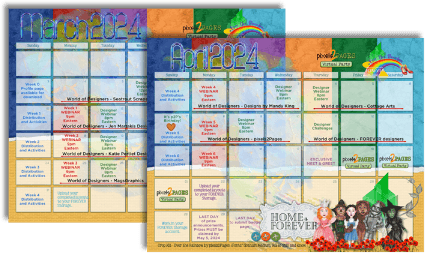
We have not done away with the Interactive Agenda. By clicking the Interactive Agenda button below you will be able to access direct links to all things related to Over the Rainbow in the order that posts are made. All posts will be listed in chronological order and will be updated over time. Blue text featured below is a direct link to that post. All times are listed in US Eastern Time.