Over the Rainbow Pre-Crop Week 5 Activities
Welcome to Week 5 of Over the Rainbow pre-crop activities. Before you know it, we will be at Training Weekend.
The official hashtag for this event is:
#p2POTRVirtualParty
Use this hashtag on every post you make for Over the Rainbow, in addition to hashtags specific to each offering. Hashtags will be provided throughout the crop. Hashtags matter because they help people find similar posts easily. Clicking on a hashtag pulls up all posts with that same hashtag.
Weekly Webinar
Each week we will present a Webinar with information to help you get prepared for training weekend. All Webinars (Weeks 1-6) will happen on Monday evenings at 9 pm ET US from March 4 to April 8, 2024. They will be recorded, so if you are unable to attend live, you can watch the recording at your convenience.
We will be conducting our Week 4 Webinar on
Monday, April 8, 2024 at 9:00 PM Eastern Time
CLICK HERE to register to watch this webinar live or to watch the recording
Note: The Week 6 Webinar will be pre-recorded and will not be held live as the pixels2Pages Team will be traveling to their location for the main event. The pre-recorded webinar will post at it's scheduled time.
The World of Designers
This week, we will be entering the world of pixels2Pages, along with a variety of other FOREVER brands (i.e Across the Pond, Art Party, Alphabet Soup, Itsy Bitsy, and FOREVER Digital Art). You can visit The World of Designers by visiting the Related Posts portion of this event.
Click the links below to register for The World of Designer Webinars:
- Tuesday, April 9, 2024, at 8:00 PM Eastern | pixels2Pages
- Thursday, April 11, 2024, at 12:00 PM Eastern | A World of Designers post will publish featuring challenges and the designer facet. There will be no webinar for this post. This post will go live as scheduled. You will get an error if you click the link before time.
Digital Art Distribution
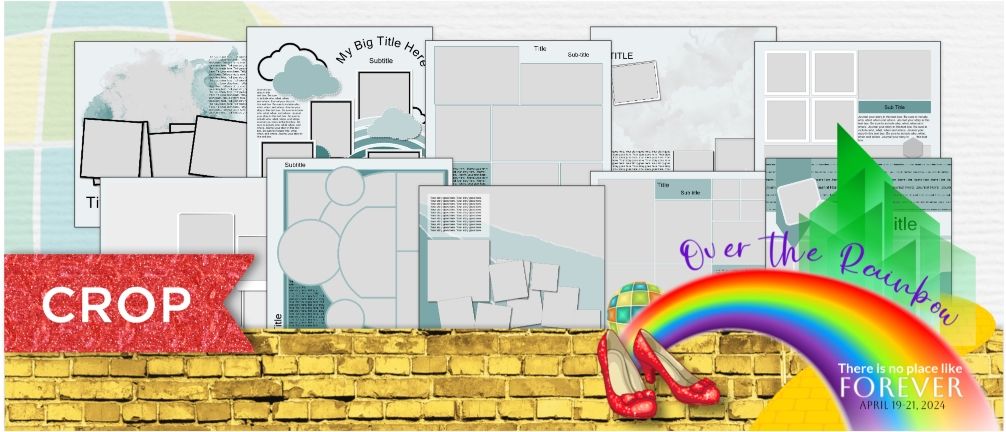
Our fifth distribution is our second distribution of Blueprints. This week we are giving you single pages layouts. Visit your goody bag to get a closer look at these designs.
Goody Bag Challenge:
This week we have 2 challenges that will give you the opportunity to win an Exclusive Blueprint or a seat at our Exclusive Meet and Greet:
Challenge 1: Use any single Blueprint from distribution 5 and create two pages:
- Create a page using any of the Blueprints with very minimal changes to the design.
- Create a second page using the same Blueprint and make the page your own. Rotate, resize, change shapes, and have fun.
- Post your page to the pixels2Pages Community using the following hashtags: #p2POTRGoodyBag and #p2PIHeartBlueprints.
Challenge 2: Create any page you desire using pixels2Pages Branded Digital Art Exclusively. Post your page to the pixels2Pages Community using the following hashtags: #p2POTRGoodyBag and #HappyBirthdayp2P.
These challenges will promote this event and potentially get additional people to join. All winners will be chosen from Facebook, however, you are welcome to post to The World of Designers collaborative album and you will be eligible for our random page draws. CLICK HERE or the image below to access the agenda.
Printable Agenda:
The full agenda is here. Please take a look at it so that you can plan out your schedule. If you download the handout, you will note that there are active links on the images and on the titles. The posts that these links go to will not publish until April 14, 2024. Clicking the links prior to that time will result in an error. There are two versions of the agenda. One is for US and Canada. The other version is for Australia and New Zealand. CLICK HERE or the image below to download the agenda.

Mandatory Badge Activities
These are the activities you must complete in order to earn your badge for the Week 5 activities.
- Download distribution 5 and add your Blueprints to your Blueprint Folder.
- View the printable agenda and plan for which breakouts you would like to attend live or watch the recordings of. We don't want you to be overwhelmed. it is okay to not watch everything live.
- Check the News section and make sure that you are up to date and have read all available news.
- Visit the profile page collaborative album and check the "Corrections Needed" nested album. If your image is there, please read the description to see what changes need to be made. Make the changes and reload your corrected profile to the main profile collaborative album.
Optional Badge Activities
These are the activities you may choose to do , but they are not required in order to earn your Week 5 badge.
- Create a page/pages for the Goody Bag Challenge.
- Sign up for the World of Designers webinars.
- If you have already purchased and received your t-shirt, take a picture of yourself with your t-shirt on and add it to our Group Photo Collaborative Album. We briefly discussed this during our Week 2 webinar.
Collecting Your Week 5 Badge
To collect your Badge for Week 5
CLICK HERE to fill out a short survey
CLICK HERE to register for the Week 5 Webinar
CLICK HERE to return to the Interactive Agenda Home Page
CLICK HERE TO REQUEST AN IMAGE/PAGE BE DELETED FROM A COLLABORATIVE ALBUM
Gallery

Share your creation on Facebook.
Share any pages you create using this technique to the pixels2Pages Facebook Community using the following hashtag:
#p2POTRVirtualParty
View Gallery Page credits and/or share your pages in a Collaborative Album.
Want to share your page in our Gallery? Maybe you want to know which kits and fonts are used on a page. Visit our Collaborative Album by clicking the button below.
Tip: Upload and Properly Credit Your Pages
Tip: Adding Photos to the Collaborative Album