The Pixie 500 PRECROP
Welcome to Pre-crop Activities. For the six weeks leading up to Training Weekend, we will distribute freebies and conduct activities all in an effort to be better prepared for the main event. Some key things to note about Pre-Crop Activities:
- They are optional. None of our breakouts are contingent on completing pre-crop activities. If your time does not allow for you to go through the pre-crop activities, you are welcome to skip the pre-crop activities and revisit them later, if desired.
- They focus on activities that will keep you organized and minimize the overwhelm. You get a massive amount of content with your registration for this event. We distribute the content little by little, so that you can organize the content little by little.
- They focus on the importance of prep work. Many people find it difficult to pick the right photos and content to go with specific trainings. Our goal is to help you pre-plan what you will need and avoid undue stress.
- They are meant to be fun. Pre-crop webinars and social activities are laid back and relaxed. We encourage you to sit back, relax, and enjoy.
Pre-Crop Calendar
Stay up to date on all things pre-crop.
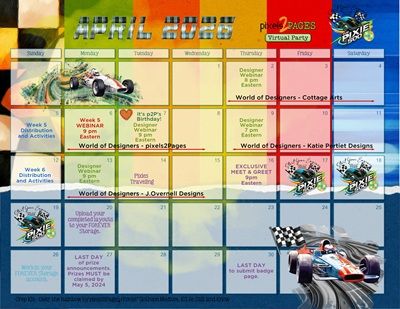
During the pre-crop period, we plan to see if you will make the cut! We will focus on cutting tools and practical uses for them. We will also focus on organizing content and photos in preparation for training weekend.
- Week 1: Profile page, joining the Facebook Group, Flats, signing up for the newsletter, etc.
- Week 2: Week 2 activities and keyboard/mouse shortcuts.
- Week 3: Week 3 activities.
- Week 4: Week 4 activities. Quick page creation.
- Week 5: Week 5 activities.
- Week 6: Repurposing existing pages. Get ready.
LINKS TO ALL DISTRIBUTIONS ARE IN THE GOODY BAG SECTION OF THIS INTERACTIVE AGENDA. ALL PRE-CROP ACTIVITIES WILL BE IN THE RELATED POSTS SECTION ON THE RIGHT OF YOUR SCREEN WHEN VIEWING ON A COMPUTER, ON THE BOTTOM OF YOUR SCREEN WHEN VIEWING FROM A MOBILE DEVICE.

Share your creation on Facebook.
Share any pages you create using this technique to the pixels2Pages Facebook Community using the following hashtag:
#p2PPixie500VirtualParty