Over the Rainbow FLATS
If you are participating in Flat Adventures, this post is for you.
Creating a Flat is an optional activity that can be lots of fun.
What is a Flat?
A flat is our version of Flat Stanley. In 2010, when 13 women created pixels2Pages, many of us had never met. Some of us were going to meet for the first time at convention and we wanted to have everyone together. We decided to bring those who could not make it to the event in flat form. We even got the community involved. You create a flat image of yourself that can go on a variety of adventures with other members of the community.
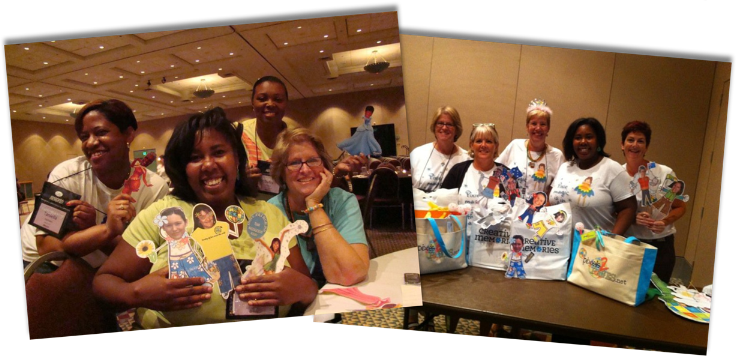
How do you create a Flat?
Don't overthink it. Flats are meant to be fun caricatures. You can dress up your flat using photos and/or your digital art library. You can custom cut yourself out of a photo and use it as a flat or cut your head out of a photo and piece it together with a variety of shapes. When in doubt, be sure to watch our Week 1 Webinar where we will briefly review the creation of a Flat. All Flats should be saved in .PNG format without a background. This will make it much easier to go on a variety of Flat Adventures.
Recommended Kits:
There are plenty of kits that have elements you can use to create or support your Flat. You can even find some elements in the freebie kits being distributed to you, or content you already have in your library. The kits in the Featured Digital Art Section of this post were designed with Flat adventures in mind.
Flat Adventures
It would be fun to keep track of all the Flats you meet using Map templates and embellishments. We will talk about this a bit more during our Week 1 Webinar.
Share your Flat Adventures
When you can, use your Flat's hashtag and post your adventures in the Over the Rainbow Facebook Community. We also encourage you to post your adventures in our collaborative album which is linked below.
Past Flat Adventure Albums by the Community
- 10th Birthday Bash by Cindy Rold
- Flats Can Have A Lot of Fun by Pam Hogben
- Mountain Top Crop by Stacy Koppenhaver
- Flat Runabouts by June Gauntley
- Flat Adventures by Bridget Clay
- Birthday Bash by Pam Hogben
- Flat Pam's Adventures 2021 by Pam Hogben
- Flat Adventures in Colorado by Cindy Berger
- Flat Adventures and Other Fun with Mary Calhoun
- Flat Adventures with Kem Kirkland
- Flat Adventures by Anne Marie Macek
CLICK HERE TO REQUEST AN IMAGE/PAGE BE DELETED FROM A COLLABORATIVE ALBUM
Gallery

Share your creation on Facebook.
Share any pages you create using this technique to the pixels2Pages Facebook Community using the following hashtag:
#p2POTRFlatAdventures
View Gallery Page credits and/or share your pages in a Collaborative Album.
Want to share your page in our Gallery? Maybe you want to know which kits and fonts are used on a page. Visit our Collaborative Album by clicking the button below.
Tip: Upload and Properly Credit Your Pages
Tip: Adding Photos to the Collaborative Album